Comments on the canvas, pinned to the exact frame
Kubrick's Comment tool pins notes to a spot or an area of the video at a specific frame, with threads, resolve and a list of every comment, and can hand them to the agent.
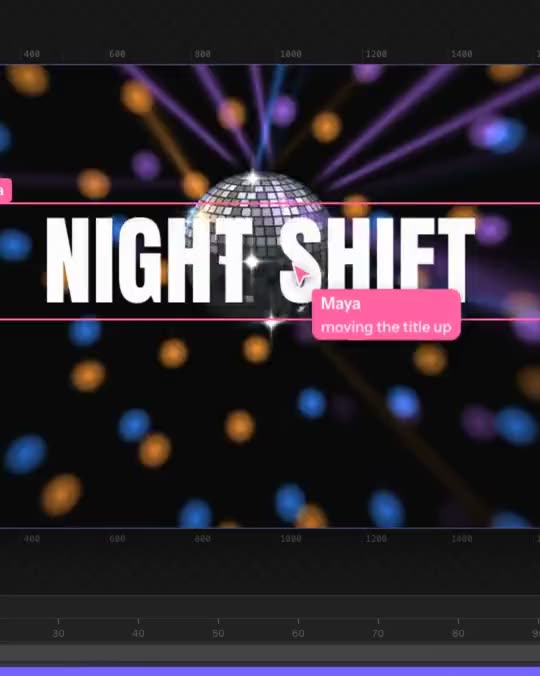
Feedback on video is hard to give in words. "The thing at the start is a bit fast" could mean anything. In Kubrick you can point at the thing.
How to use it
Press C, or the Comment button in the top toolbar. Your cursor turns into a speech bubble.
- Click the video to pin a note to a point.
- Drag to mark an area.
The comment is tied to the frame the playhead is on. A thread opens next to the pin: type your note, and mark it as about This frame or General. A pin dropped on a layer is about that layer. Press Enter or Esc to close it; an empty one is thrown away.
Pins show as bubbles in their author's colour, so you can see at a glance whose notes are whose. Threads take replies, and can be resolved once they're dealt with.
The comment list
While the tool is on, the right side of the editor lists every comment in the project, filtered by Open or Resolved. From there you can:
- Send to agent, so Kubrick's agent works through the notes for you
- Copy them, to paste into a doc or a message
- dictate or sketch a note instead of typing it
Why it's useful
Review rounds go faster when every note sits on the frame it's about. Share the project with whoever needs to review it, ask for comments, then send the open ones to the agent and check what it did.
Try it in Kubrick
Start free trial